Article
Hiring a Virtual Assistant: What you need to know

Table of Contents
- 1) What a Virtual Assistant Is (and Is Not) in 2026
- 2) Readiness Checklist: Time, Money, Operations, Mindset
- 3) Quick Sidebar: Why Outsource Instead of Hiring Locally
- 4) DIY Hiring vs Managed Providers
- 5) Security and Data Handling
- 6) Interview and Trial Playbook
- 7) Red Flags
- Wrapping Up
1) What is a Virtual Assistant?
A virtual assistant is a remote professional who handles operational or specialist tasks using online tools instead of working in your office. The role grew out of the “remote secretary” / “telecommuting assistant” era of the 1990s, exploded with global outsourcing in the 2000s, and matured in the 2010s as tools like Google Workspace, Zoom, and Slack made it normal to run your entire back office in the cloud. Since 2020, the pandemic and widespread remote work have pushed VAs from a “nice-to-have” into a mainstream staffing strategy.
In 2026, a VA is best thought of as a remote operations teammate who sits inside your systems (email, calendar, CRM, help desk, project tools) and keeps the day-to-day machine moving.
Common work includes:
Admin and executive support – inbox and calendar management, travel booking, document prep, meeting notes and follow-up, light project coordination, updating agendas and to-do lists so leaders stay in their “high-leverage” zone.
Marketing support – social scheduling and basic community replies, content formatting in your CMS, simple design in tools like Canva, email newsletter setup, uploading and tagging blog posts, light SEO tasks like meta titles, alt text, and internal linking.
Operations and support – help desk replies and ticket triage, CRM updates and pipeline hygiene, order follow up, appointment scheduling and rescheduling, keeping SOPs and internal docs current.
Sales support – lead research and list building, outbound email and LinkedIn sequences, CRM hygiene, preparing proposals and slide decks, organizing call notes, chasing next steps and follow-ups.
Finance and back office – basic invoicing, billing follow up, vendor coordination, expense tracking, receipt collection, and supervised bookkeeping prep so your accountant or controller isn’t doing data entry.
Industry-specific help – real estate transaction coordination, medical scheduling and billing support, legal admin and filing, e-commerce catalog management (listings, images, descriptions), SaaS customer onboarding and renewal reminders, and more.
Modern teams also expect VAs to be comfortable with AI tools (ChatGPT-style assistants, AI research tools, transcription and summarization). A strong 2026 VA will use AI to:
- draft and polish emails and documents
- summarize long calls, transcripts, and PDFs
- structure research into usable briefs or comparison tables
- generate first-pass content that they then edit for accuracy and tone
That means you’re buying a human-plus-AI workflow instead of raw hours: the VA brings judgement, context, and relationship management, while AI accelerates the low-level writing and research.
Equally important is what a VA is not. A virtual assistant is not a licensed professional (attorney, CPA, clinician), not a senior strategist who sets your business model, and not a one-person replacement for an entire marketing, sales, or finance department. They shine when you give them clear outcomes, defined responsibilities, and access to the right tools—so they can take recurring, process-driven work off your plate and keep your operation moving every single day.
2) Readiness Checklist: Time, Money, Operations, Mindset
You are ready when you can pass four checks.
Time and focus
- You spend 10+ hours a week on tasks you would happily pay someone $10-$25 per hour to do.
- Your calendar, inbox, or backlog is blocking revenue work.
- You’re spending time on tasks that you know you should be delegating to someone else.
- Critical projects are stuck because you are buried in logistics.
If your effective hourly value is $100+ and you spend a quarter of your week on $15-$30 tasks, you are losing thousands every month.
There is a quick way to check and get some dollar values around your wasted time called The Sticky Challenge (by MyOutDesk). There are other versions of this which can be found here:
- Stick Notes: Manage Your Time, Dont Let It Manage You
- How to Use Sticky Notes for Better Time & Schedule Management
The core thing is to add up all your time and do some rough math to figure out your own hourly rate vs. how much it would be to outsource it. If the calculus checks out, you probably should get someone.
The AI Time Audit (Sticky Challenge On Steroids)
We can do some rough math on the above, but the real benefit here would be a mix of something else: take all your sticky notes, google calendar, take pictures and give it to ChatGPT, Gemini, or Claude. Give it the following prompt:
**Role:** You are an expert Executive Business Coach and Time-Audit Analyst.

**Task:** I have uploaded an image of my "Sticky Note Audit." Each note represents a task I currently perform in my business. Please analyze the handwriting, transcribe the tasks, and categorize them to help me determine if I am ready to hire a Virtual Assistant.

**Analysis Criteria:**
1. **Transcribe:** Read the text on each note. If a note is unclear, make your best guess based on context.
2. **Categorize:** Sort every task into one of two buckets:
   * **Dollar-Producing / CEO Tasks:** High-leverage activities that directly drive revenue, strategy, or growth (e.g., Sales calls, partnership negotiation, product development, investor relations).
   * **Non-Dollar-Producing / Delegatable Tasks:** Admin, maintenance, or low-leverage activities that maintain the status quo but do not grow the business (e.g., Email scheduling, data entry, customer support, file organization, research).

**Output Format:**
Please provide your response in the following format:

**1. The Breakdown Table**
| Task (From Note) | Category | Estimated Value ($/hr) |
| :--- | :--- | :--- |
| [Task Name] | [CEO or Delegate] | [$1000, $100, or $20] |

**2. The "Effective Hourly Rate"**
* **Total Tasks Analyzed:** [Number]
* **Percentage of Time Spent on Non-Dollar Tasks:** [X%]
* **Analysis:** "Based on these notes, you are currently spending [X]% of your time on tasks that could be handled by a $15/hr specialist."

**3. The Verdict**
Give me a harsh but fair assessment. Am I acting as a CEO, or am I acting as an overpriced assistant? Should I hire immediately?
Let that prompt cook for a bit in pro mode \ thinking mode and come back with some answers. Here is an example response from Gemini:
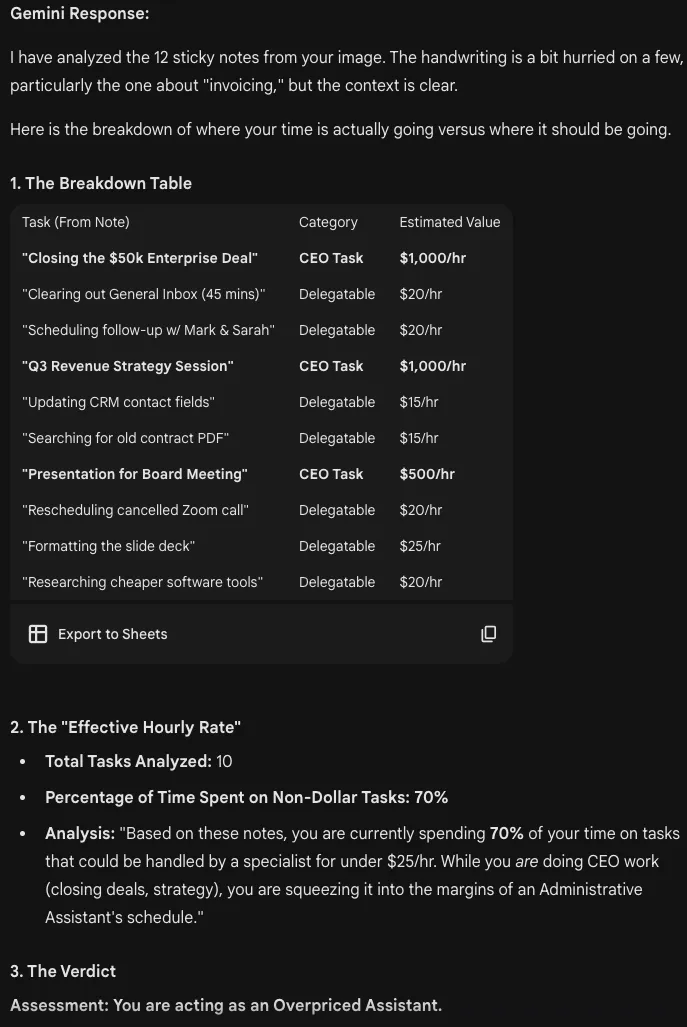
The core takeaway here is Annualized Revenue Loss:
3. The Verdict
Assessment: You are acting as an Overpriced Assistant.

You are currently the bottleneck in your own sales pipeline. Every minute you spend "canvassing your inbox" or "updating CRM fields" is a minute you are not spending closing that $50k Enterprise Deal. You are paying yourself a CEO salary to do data entry.

You do not have a "time" problem; you have a "task switching" problem. You are burning your high-level creative energy on low-level maintenance. You are ready to hire immediately.

4. The Cost of Inaction
Assumption: You work 40 hours/week.

Current Reality: You spend approx. 28 hours (70%) on $20/hr tasks.

Opportunity Cost: If those 28 hours were spent on $500/hr CEO activities (biz dev, closing, partnerships), you are losing $13,440 per week in potential value.

Annual Revenue Lost: $672,000 / year by not hiring a VA.
Financial readiness
This probably goes without saying, but you should be profitable. You should be allocating and planning for someone to be added to your team and for that person to be an integral part of your business. A Virtual Assistant is different than someone at Fiverr or UpWork, they are going to be working for you and in it for the long haul.
Assume that you’re going to be spending between $2000 - $2500/month for a Virtual Assistant (source).
Before you get a little sticker shock: consider the median annual wage in the United States is $61,702 per year!. If the $2,500 is scaring you, then you may not be ready for a VA.
MyOutDesk has a great Savings Calculator for this: link
Operational readiness
After you’ve cleared the other hurdles (you’re wasting your own time, you’re profitable, you can afford it) then we need to break into what you need to get started. The main thing is to make your SOPs (Standard Operating Procedures)
- Get all your current tasks documented
- You have examples of what “good” and “great” looks like (emails, reports, templates, etc.).
- You have a clear understanding of what needs to be done, how to train someone how to do it.
You are not ready if your processes change weekly with no pattern or you expect a VA to fix the business with no direction.
Mindset readiness
- Spend 2-5 hours in week one to document or record Loom walkthroughs.
- Accept that weeks 1-4 are for learning, not perfection.
- Give fast, specific feedback.
3) Quick Sidebar: Why Outsource Instead of Hiring Locally
I don’t think people realize just how many businesses outsource and how approachable it is. Before now, many businesses outsourced to giant call centers in India - like AT&T, Verizon, etc. In 2026, thanks to remote work, outsourcing is accessible to nearly all small to medium sized businesses. Additionally, AI has leveled the playing field allowing even more productive remote work. You won’t need to worry as much about misspellings, typos, or grammar errors with overseas talent. They’ll come with AI out of the box, ready to help them respond to customers on your behalf or quickly pick up new skills in existing software (Canva, etc).
Cost savings
- 59-70% of businesses outsource primarily to cut costs.
- The math does not lie, up to 70% savings vs in-house once you include benefits, office, and downtime. source
- They have their own device, office space, internet connection.
Efficiency and focus
Teams that outsource keep core people selling, building, and talking to customers instead of doing busy-work.
Global talent and time zones
- Tap skilled talent in the Philippines, Latin America, Eastern Europe, South Asia, and more at lower cost.
- Use time zones for overnight research, next-day inbox clearing, and late-night support.
Flexibility and scale
- Avoid leases, hardware, and full-time benefit commitments.
- Add a second VA for new functions without rehiring overhead, in fact: the first VA can train your second VA. They can also train your third VA.
4) DIY Hiring vs Managed Providers
DIY (marketplaces, referrals)
Pros: lower hourly rates, direct control, flexible scopes.
Cons: more vetting, more management, higher risk of churn or quality swings.
Use DIY if you have tight SOPs, time to interview, and a clear set of tasks. This is usually project based work, and I have not seen many companies use this model for ongoing work.
I’ve extensively used a few people on Fiverr for project-based work, especially in the creative space. This includes things like banners, ads, digital art, and logos for small projects I’ve worked on. One key point: always read the deliverable terms carefully and confirm you’re receiving the underlying source assets (for example, layered Photoshop files and editable Illustrator files), not just exported images. If your only getting the final assets then the chance you’ll end up paying top dollar for AI slop is much higher. The friction point with Fiverr here, especially, is social proof.
The person I hired on Fiverr for several projects turned out to be a full agency of several people - likely to fill revenue or give some people more work to do. However, I was not able to find a company website or specific because Fiverr tightly controls things to make sure artists don’t go off-network and pay them backdoor. The work was good, it was not AI slop, but I can’t actually go hire them directly or figure out if they have third party proof outside of the network.
That limitation didn’t really hurt until later: my favorite brand/icon designer from Indonesia left Fiverr. Because all communication was locked inside the platform, I had no way to reach them again for additional logo work - they effectively disappeared. That’s why this site is logo-less.
Managed VA companies
Pros: vetting, replacements, training, and coverage for vacations or churn.
Cons: higher rates
Use a provider if you want reliability, backups, and help with training or compliance. Think of it just like recruitment on-shore. They find a match just like a recruiter would and take care of all the nonsense like taxes, payroll, etc. They also handle the hiring process, including background checks.
5) Security and Data Handling
The amount of breaches from third party companies, contractors, and vendors is increasing (source). It’s really important that you just make sure they use a password manager and follow best practices for data handling, even if they are on their own BYOD device.
- Use password managers, seriously. 1Password.
- Use 2-factor authentication for all accounts.
6) Interview and Trial Playbook
In 2026, hiring a VA is not much different than hiring someone on shore. Think back to how you hired in covid times and repeat that process. There are so many guides like this one that will help you get started.
The main thing I would stress is communication: ask them to describe their workflow, how they handle communication, and how they handle feedback. Make sure they understand you, make sure they can use AI, and ask yourself: do I feel comfortable giving this person an email with my company domain on it? If yes, then you’re good to go.
7) Red Flags
There are some red flags on managed providers that I want to point out
- No clarity on worker locations, entity registration, and legal compliance.
- Vague pricing that hides hourly equivalents or add-on fees.
- No backup or replacement policy.
- Slow responses during the trial phase.
Wrapping Up
Hiring a VA in 2026 is more accessible than ever before. If you have repeatable tasks, a clear outcome in mind, and the willingness to spend a few hours onboarding, a VA can become one of the highest-ROI hires you’ll ever make.
Start small, document early, and give clear feedback. Whether you recruit directly or use a managed provider, the goal is the same: protect your time, keep your operation moving, and put your focus back where the business actually grows.
You can research a few companies here or you can read some comprehensive reviews at Virtual Assistant Assistant
About the Author
James King is the founder and editor of OutsourcingKing. He has spent years evaluating virtual assistant providers, BPO firms, and remote staffing agencies from the buyer's side, with a focus on pricing structures, worker ownership models, and operational risk.
Tags
hiringvirtual-assistants2026